GPS Share - Locator & Live
- 5.0
- Rating
- 10.00K
- Installs
- Free
- Price

 Analysis by App-foxy
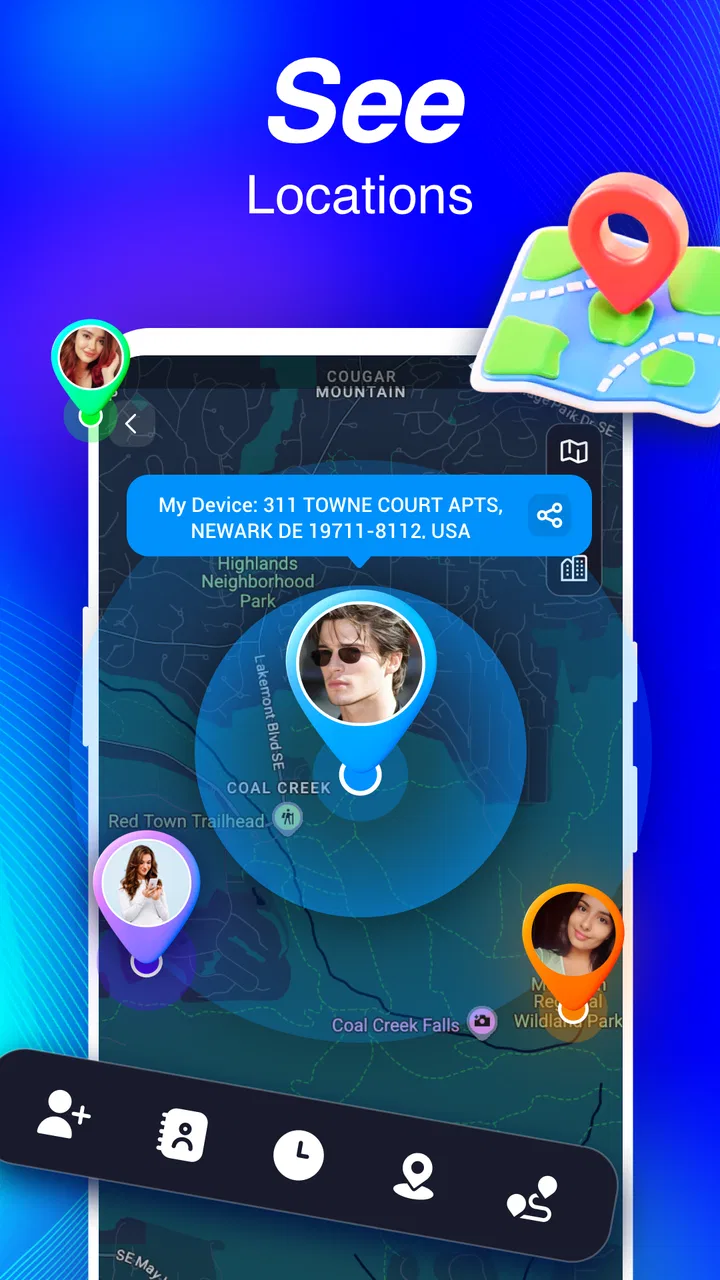
I like location tools that solve one clear problem without turning a simple check-in into a complicated social network. GPS Share - Locator & Live takes that focused approach. It is a free Maps & Navigation app from Local-Weather Forecast built around family location sharing, live GPS visibility, alerts, and a history log. After using it, my main impression is that it is most useful as a practical reassurance tool: you open it when you need to know where someone is, whether they have reached a place, or how a journey unfolded.
That focus is also the reason I would not recommend it to everyone. If you want a full-featured navigation platform with route planning, traffic intelligence, public transport guidance, or a large community layer, this is not the app I would put first. If your priority is keeping track of a small circle of relatives or coordinating everyday movements, however, its straightforward purpose makes more sense than trying to force a general map app to handle family check-ins.
What using GPS Share feels like in everyday life
The most convincing use case is a normal family day rather than an emergency scenario. Imagine a parent leaving work while a child is travelling home, or two relatives trying to meet in an unfamiliar part of town. Instead of sending repeated messages such as “Where are you now?” and “How long will you be?”, the location-sharing setup gives everyone a more direct way to stay informed. The app’s live GPS focus is useful here because it reduces the need for manual updates.
You May Also Like

 AccuWeather: Weather Radar
AccuWeather Review: A Quick, Clear Forecast for Everyday Decisions
For everyday plans, the best forecast is the one you can understand quickly. AccuWeather makes rain timing, radar, and local conditions easy to act on, with a few trade-offs.

 Hill Climb Racing
Why Hill Climb Racing Still Turns Crashes Into One More Run
A tiny car, a bumpy hill and one more upgrade: Hill Climb Racing keeps resurfacing because its simple chaos makes every near-miss feel personal.

 AliExpress - Shopping App
AliExpress Makes Global Shopping Feel Personal, but Shoppers Bear the Risk
AliExpress turns a global marketplace into a pocket-sized discovery engine. Its reach is useful, its shopping loop compelling, and its trade-offs easy to miss.

 Lords Mobile: Kingdom Wars
Lords Mobile Is a Kingdom-Building Routine, Not a Quick Match
A case-by-case verdict on the building, battles, device demands, and social commitments that make Lords Mobile rewarding for some players and exhausting for others.

 PDF Scanner app - TapScanner
TapScanner Makes Paperwork Easier to Capture, Check, and Share
TapScanner makes scanning with a phone feel less like a rescue operation and more like a dependable step in getting work done. Its capture tools are useful, though not flawless.

 Block Blast!
 Shows How Much a Puzzle Game Can Leave Out
A quiet grid game shows why puzzle players increasingly value instant clarity, repeatable skill and low-pressure play—and where the genre still needs to catch up.
More From Our News Desk
View All News


I also found the combination of real-time sharing and location alerts more practical than either feature alone. A live view is helpful when you are actively waiting for someone, but an alert can be more convenient when you are busy and only need to know when a person reaches a relevant place. That distinction matters: constantly checking a map can become a habit, while a well-timed notification can let you get on with your day.
The history log adds another layer of usefulness. It is not just about seeing where someone is at this moment; it can help you look back at a journey and understand the sequence of movement. For a family coordinating school, work, errands, or appointments, that record may be more useful than a single snapshot. I would treat it as a practical reference rather than a substitute for communication, since a map alone cannot explain why somebody stopped, changed direction, or took longer than expected.
The app’s short store description is “GPS Share,” but that wording does not fully capture the everyday value. The more complete picture is a small set of connected tools: sharing a position, watching movement as it happens, receiving location-based alerts, and reviewing previous activity. Those pieces support different situations, and the app is at its best when they are used selectively instead of leaving live tracking running without a clear reason.
Live sharing is strongest when the timing matters
Real-time location is especially helpful during a pickup. I can see why a family would use it when someone is waiting outside a station, arriving at an event, or travelling home after dark. The person waiting does not need a detailed explanation of every turn, and the traveller does not need to stop and type updates while moving. In that narrow but common situation, the app feels more useful than ordinary messaging.
There is a trade-off, though. Live location only helps when the people involved understand when sharing should begin and end. A family may need a simple routine, such as starting a session before a journey and stopping it afterward, rather than treating continuous visibility as the default. That is not a flaw unique to this app, but it is an important part of using any location-sharing service responsibly.
I would also avoid assuming that a moving dot tells the whole story. GPS can be affected by buildings, underground travel, crowded urban areas, or a device that has limited connectivity. Even when the app is working properly, the displayed position should be read as useful guidance, not as a guarantee that someone is standing at an exact doorway. This is one reason I prefer using the map alongside a quick message when timing or safety is genuinely important.
Alerts can replace repeated check-ins
The alert function is one of the more valuable parts of the concept because it changes the way you interact with the app. Instead of opening the map repeatedly, you can rely on a notification for a meaningful arrival or departure. For a parent waiting for a child, a partner expecting someone home, or relatives coordinating a shared appointment, that can remove a lot of unnecessary back-and-forth.
The useful insight is to set alerts around decisions, not curiosity. An alert that tells you a person has reached a destination can prompt you to unlock a door, leave for a pickup, or stop worrying about a late arrival. By contrast, creating too many alerts may make the system noisy and reduce the value of the important ones. I would keep the setup small and tied to places or journeys that genuinely matter.
Alerts also work best when everyone agrees on their purpose. Location tools can easily feel intrusive if one person sees them as a safety arrangement and another sees them as constant supervision. The app cannot solve that relationship issue for you. Its strength is that it provides a mechanism for coordination; the quality of the experience still depends on clear boundaries between the people sharing their locations.
The history log is more useful for patterns than arguments
A location history can answer practical questions such as whether a route was completed, where a delay may have occurred, or how a trip was arranged. I see value in that when a family is trying to improve its routine. For example, reviewing a regular journey could show that a pickup needs to happen earlier or that a meeting point is creating confusion.
Where I would be careful is using the history as a tool for suspicion. A record of movement does not provide context, and interpreting every stop as evidence of something can quickly turn a helpful safety feature into a source of conflict. My recommendation is to use the log for planning and reassurance, not as a replacement for trust or conversation.
That distinction is a meaningful part of the app’s design appeal. It offers information that can be useful without pretending that location data explains a person’s intentions. Readers looking for family coordination should appreciate that limitation before installing it, because the best experience comes from treating the app as a shared convenience rather than an invisible monitoring system.
Where it differs from ordinary navigation apps
Most familiar navigation apps are designed around getting one person from one place to another. They excel at maps, directions, route choices, and sometimes traffic or local discovery. GPS Share - Locator & Live has a different centre of gravity. Its purpose is not to tell me which road to take; it is to help me understand where members of a chosen circle are and whether a journey has reached an expected stage.
That makes the comparison fairly simple. I would use a conventional navigation app to plan a drive, find a business, or compare routes. I would use this app when the important question is “Has my family member arrived?” or “Where are we in relation to one another right now?” A messaging app can handle manual check-ins, but it depends on each person remembering to send them. This app is more suitable when location awareness needs to be available without constant typing.
The trade-off is that a dedicated family locator may feel unnecessary for people who only share their whereabouts occasionally. If your household already manages every trip through messages and you rarely need alerts or a history view, another app may be simpler. GPS Share - Locator & Live earns its place when repeated coordination is part of your routine.
What I would check before relying on it
Because this is a location-focused app, I would spend a little time testing it before making it part of a safety routine. Add the people who will actually use it, confirm that sharing behaves as expected, and try an alert during an ordinary trip. A short test can reveal whether everyone understands the interface and whether the chosen setup fits the family’s habits.
I would also make sure every participant knows who can see their location and when. That conversation is not unnecessary preparation; it is part of using the app well. The convenience of a live family locator is only worthwhile when sharing is informed and mutually understood. If somebody is uncomfortable with continuous visibility, a limited, journey-based arrangement may be more appropriate than leaving location access active all day.
Another practical tip is to avoid making the app the only communication channel during important travel. A live position can become outdated or unclear, while a message can explain a delay immediately. I would use GPS Share for the visual overview and alerts, then use a call or message when plans change. That combination is more dependable than expecting any map to provide complete context.
Performance expectations and everyday friction
The app is free, which lowers the barrier to trying it with a family group. It is rated for Everyone, so its general positioning is accessible rather than aimed at a specialist audience. The current release is version 1.0.6, and the app runs on Android 7.0 or newer. Those details make it approachable for people using older Android devices, although the quality of the experience will still depend on the phones, connectivity, and battery habits of the people sharing locations.
Location sharing naturally asks more from a phone than a static map view. Keeping GPS active, transmitting updates, and checking movement can affect battery life, particularly during long journeys. I would not begin a full-day trip without considering that practical issue. A person whose phone is nearly empty may stop appearing reliably, and that can create more worry instead of less.
There is also a learning curve around notification discipline. Alerts are valuable when they are specific, but less useful when they arrive too frequently or are created for every small movement. The app’s strongest workflow is deliberately modest: share when there is a reason, create alerts for meaningful destinations, and review history when it helps with planning. Using every option constantly would make the experience feel heavier than it needs to be.
The app has a 5.0 average from around sixty ratings and has passed ten thousand installs, which suggests a small but positive early audience. I would read that as encouraging rather than conclusive. A location service becomes more valuable when the people you need to coordinate with are willing to use it consistently, so the household’s participation matters more than a rating alone.
Who should choose it, and who should skip it
I would recommend GPS Share - Locator & Live to families who regularly coordinate pickups, commutes, school journeys, or arrivals. It is also a sensible option for relatives who want a shared view of travel without relying on a stream of manual messages. The combination of live positioning, alerts, and a history log gives it more practical range than a simple one-time location pin.
It may suit people who want a dedicated tool rather than a broad social platform. The Maps & Navigation category is a good fit because the app is about movement and whereabouts, but its value is relational: it connects a map to the needs of a family or trusted group. That makes it particularly useful for routines where the same people are checking in repeatedly.
I would skip it if you need turn-by-turn navigation as the main feature. It is also not the right choice for anyone who dislikes sharing location information, even temporarily, or for groups that will not agree on clear usage rules. A standard navigation app is better for route planning, and ordinary messaging may be enough for occasional meetups. Choosing this app only because it is free would not be a good reason; the real benefit comes from having a recurring need for shared location awareness.
My final view after weighing the trade-offs
GPS Share - Locator & Live is best understood as a family coordination tool, not a replacement for a full navigation suite. Its strongest idea is the way live sharing, alerts, and a history log cover different stages of the same journey. You can watch a trip while it is happening, receive a useful arrival signal, and later look back at the route when planning needs it.
Its limitations are equally clear. Location information needs context, live tracking can affect a phone’s resources, and the app cannot replace communication when plans change. Privacy expectations also need to be agreed between users before the convenience becomes part of daily life. Those are not reasons to dismiss it, but they are reasons to use it thoughtfully.
Developed by Local-Weather Forecast, this free app feels most worthwhile for a small, trusted group with a real need for recurring check-ins. I would install it for a family that often asks where someone is, when they will arrive, or whether a journey is complete. For everyone else, a regular map or messaging app may remain the simpler choice. My recommendation is therefore positive but specific: choose it when shared location is an everyday coordination problem, and use its alerts and history with clear boundaries rather than treating the map as a substitute for trust.
FAQs for GPS Share - Locator & Live
01What features does GPS Share - Locator & Live offer?
GPS Share - Locator & Live provides real-time location tracking, allowing users to share their location with friends and family. The app includes features like location history, geofencing alerts, and group tracking. It ensures privacy with customizable sharing settings, so you can control who sees your location and when.
02Is GPS Share - Locator & Live available for both Android and iOS?
Yes, GPS Share - Locator & Live is available on both Android and iOS platforms. The app can be downloaded from the Google Play Store for Android users and the Apple App Store for iOS users. Ensure your device meets the compatibility requirements before downloading.
03How does GPS Share - Locator & Live ensure privacy?
The app prioritizes user privacy by offering customizable privacy settings. Users can choose who sees their location and for how long. The app uses secure connections for data transmission and does not share your location data without your explicit consent. Always review the privacy policy for more details.
04Can I use GPS Share - Locator & Live without an internet connection?
GPS Share - Locator & Live requires an active internet connection to share real-time locations and receive updates. However, you can still view your location history offline. For optimal performance and accuracy, ensure your device has a stable internet connection while using the app.
05Are there any subscription fees for using GPS Share - Locator & Live?
GPS Share - Locator & Live offers both free and premium subscription plans. The free version provides basic location sharing features, while the premium version includes advanced options like location history, geofencing, and ad-free experience. Check the app’s pricing details in the store for the latest subscription information.
Pros
- Accurate real-time location sharing.
- User-friendly interface for all ages.
- Low battery consumption during use.
- Supports group location sharing.
- Works seamlessly across devices.
Cons
- Limited offline functionality.
- Ads can be intrusive at times.
- Requires constant internet connection.
- Privacy concerns with data sharing.
- In-app purchases for advanced features.

GPS Share - Locator & Live
Gallery